




A workout log is the simplest, evidence-backed way to make sure your gym training actually leads somewhere. When you write down your exercises, weights and reps, you know exactly what you need to do in every session to move forward. Below is what to record in a workout log, whether to pick a paper notebook, Excel or an app, and how to analyze your entries. At the end we share what over 111,000 working sets logged in SisuLift have taught us about how Finns train.
Why a workout log works: the research is clear
Muscle growth and strength gains require progressive overload: doing slightly more than last time. The problem is memory. You simply cannot remember the weights and reps from three weeks ago across ten different exercises, so without a log, progression turns into guesswork.
The evidence is unusually consistent. A meta-analysis published in Psychological Bulletin (Harkin et al. 2016, 138 studies and nearly 20,000 participants) showed that monitoring progress clearly improves goal attainment, and the effect gets stronger when progress is physically recorded and made visible. In practice, a workout log gives you four things: Harkin et al. 2016, Psychological Bulletin (DOI 10.1037/bul0000025)
- Progress in black and white: you always know what you did last time and what to aim for today
- You spot stalled progress early and can react before frustration kicks in
- Motivation survives bad weeks, because you can see how far you have already come
- You can compare programs: which volume, split and exercise selection worked best for you
What should you record in a workout log?
A good workout log is simple. If logging takes more than a few seconds per set, it will not get done. The minimum that is enough to track progression:
- Date and workout name (e.g. Push A, Legs B)
- Exercises in the order you did them
- Weight and reps for every set, including the failed ones
- A short note if something was off (pain, rush, bad sleep)
Once logging is a habit, these extras deepen the analysis:
- RPE, perceived exertion on a 1-10 scale (how many reps were left in the tank)
- Rest times between sets, if you train with a timer
- Sleep and energy level before the session
- Body weight, if you are bulking or cutting
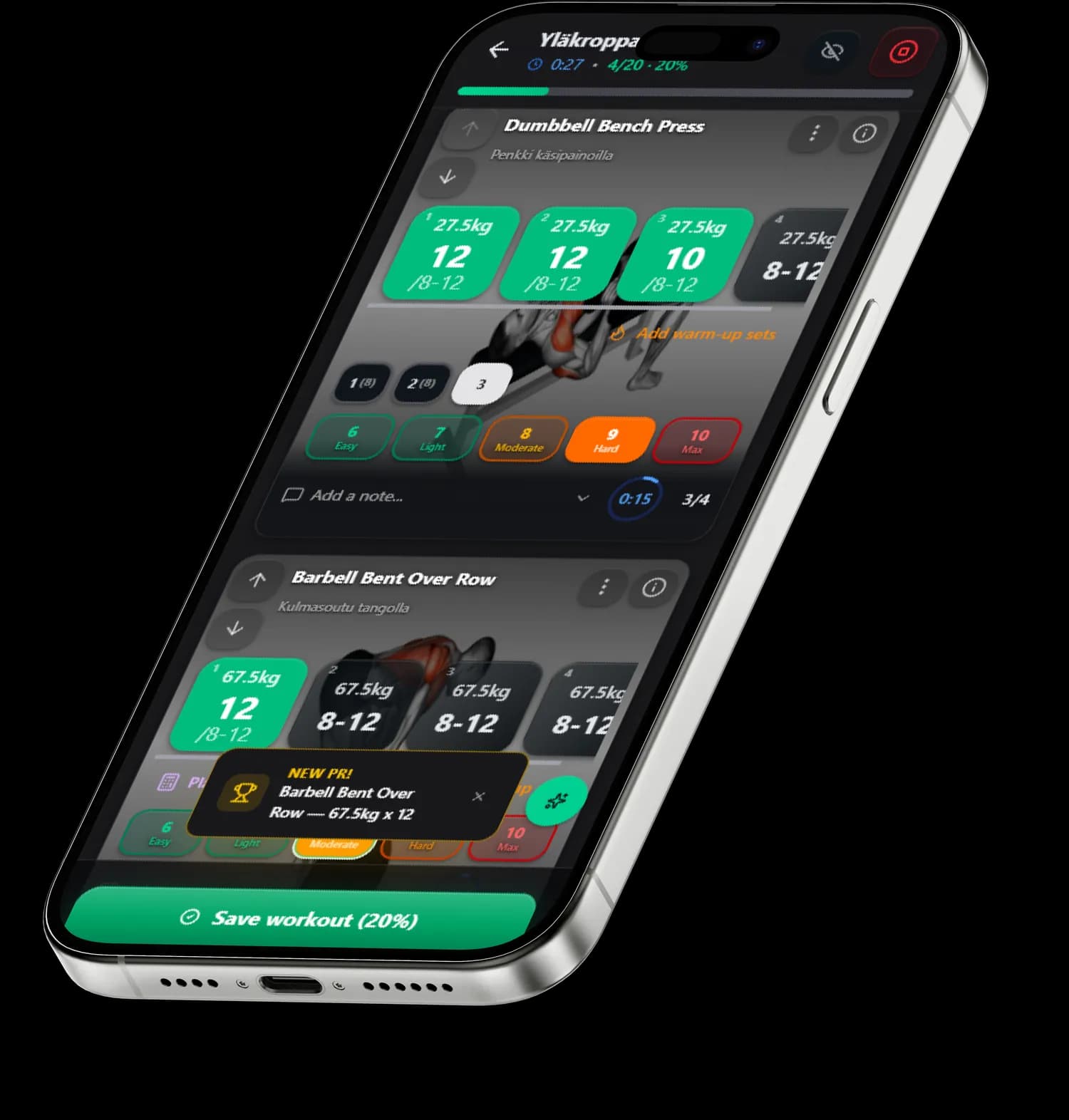
RPE deserves a special mention. The same 80 kilos can feel like RPE 7 on a good day and RPE 9 on a bad one, and that is exactly the information that later explains why a session flew or dragged. Without it the numbers look identical even though the days were completely different.
RPE scale for logging
RPE (rate of perceived exertion) tells how close to failure a set went. It is the number your next weight is decided from.
- RPE 10: no reps left
- RPE 9: one rep left
- RPE 8: two reps left
- RPE 7: three reps left
- RPE 6 or below: warm-up or technique set
Example entry
Paper notebook, Excel or an app?
All three work, and to be honest: the best tool is the one you actually use every session. Each has clear strengths and weaknesses:
Paper notebook, Excel and app compared
| Feature | Paper notebook | Excel | App |
|---|---|---|---|
| Logging speed at the gym | ✓ Fast | ✕ Slow | ✓ Fast |
| Progress charts and analysis | ✕ Manual | ~ Build it yourself | ✓ Automatic |
| Backup | ✕ None | ~ Cloud if you remember | ✓ Automatic |
| Previous weights visible | ~ By browsing | ~ By browsing | ✓ In the logging view |
| Distraction-free | ✓ No notifications | ~ Depends on device | ✕ Phone tempts you |
| Price | ✓ A couple of euros | ✓ Free | ~ Free or subscription |
Paper wins on distraction-free focus, an app wins on analysis and reliability. Many experienced lifters use a hybrid model: numbers into the app at the gym, free-form notes into a notebook in the evening. Excel gives you full customization, but requires that you both record at the gym and transfer the data later. Finnish lifting forums repeat the same observation year after year: starting a log is easy, keeping it going is the hard part. So pick the tool with the least friction for you.
A digital workout log, meaning an app or a spreadsheet, beats paper in one thing: it does the math for you. A paper training diary, on the other hand, never crashes, needs no battery and does not interrupt you with notifications. Pick the one you will actually use.
Free workout log template
You do not need a product to get started. Copy this structure into a notebook, your phone notes or Excel:
- Header row: date, workout name, energy level 1-10, sleep in hours
- One row per exercise: exercise name, then sets as weight x reps
- Example: Bench press 60x8, 60x8, 62.5x6 (RPE 8)
- One line of notes at the end: what moved, what did not, what to revisit
- At the end of the week a summary: how many planned sessions actually happened
This template takes about five seconds per set and still contains everything progression tracking requires. Three months from now you will have data that shows exactly what works.
Download the free template
The template is free and needs no email. The Excel version has ready formulas for estimated one-rep max (e1RM) and weekly volume. You can save the printable version as a PDF from your browser's print dialog.
How to analyze your entries
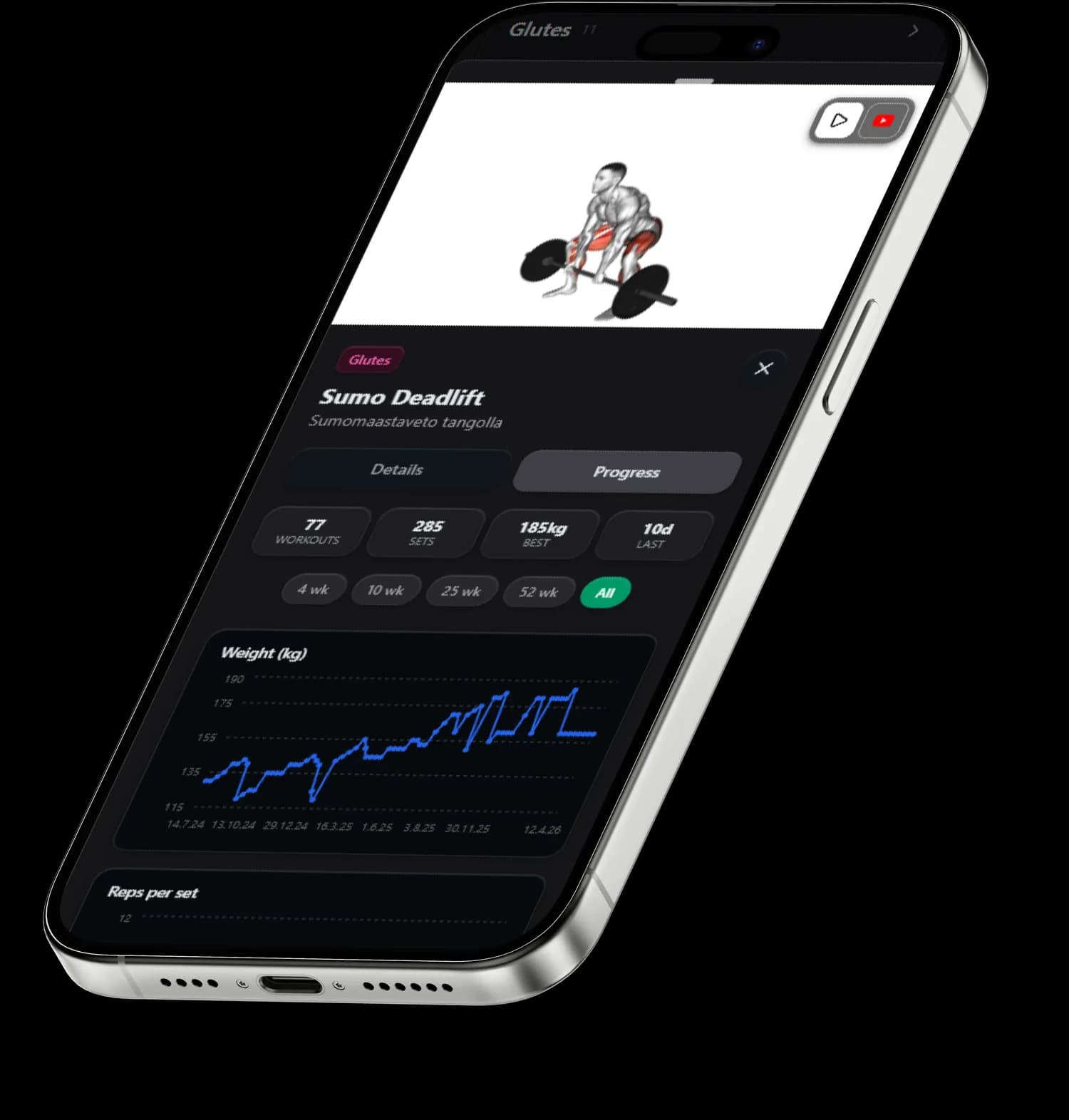
Logging is pointless if you never look back. A weekly five-minute review is enough:
- Progression: did weight, reps or set count go up from last week in at least one exercise?
- Volume: how many working sets per muscle group? For most people 10-20 sets per week is the effective range
- RPE trend: if the same weights feel heavier for several weeks, you are not recovering enough
Monthly, track your estimated one-rep max. With the Epley formula, 60 kg for 8 reps equals roughly a 76 kg max (weight x (1 + reps / 30)). Calculating this for your main lifts once a month shows the direction of your strength even when your rep ranges vary.
The most common workout log mistakes
- Logging only the wins. A failed set is the most valuable data you have, record it honestly
- Logging too much. Fifteen metrics you never analyze are worse than four you actually follow
- Never reading old entries. The value of a log comes from the analysis
- Logging inconsistently. Gaps in the data distort trends and kill comparability
- Logging from memory at home. Record right after the set, memory always rounds up
What 111,000 logged working sets tell us about how Finns train
Data: 111,572 working sets in 6,362 completed gym sessions, 566 users. Status 2 Sep 2026. Imported data from other apps, watch recordings, warm-up sets and bodyweight-only sets are excluded.
SisuLift is at its core a workout log that thinks for you. Users have logged over 111,000 working sets across more than 6,300 gym sessions, roughly 46,000 tonnes of iron in total. A few things show up in the anonymized data, and some of them surprised us too:
- A full logged gym session contains 17.5 working sets on average, with a median of 17. That is more than most programs prescribe, so many people do more at the gym than they think they do
- The most logged exercise is the leg press, followed by the barbell bench press and the barbell bent-over row
- In a week where someone lifts at all, they average 2.5 gym sessions with a median of 2. Fewer than half of those weeks contained three or more sessions, so the classic three-times-a-week happens roughly every other week
This is also an honest sales pitch: SisuLift removes the most tedious part of keeping a workout log. The app shows your previous weights and reps right in the logging view, suggests the next weights for every exercise and draws your progress charts automatically. Your job is tapping a set as done. If a paper notebook works for you, keep using it. If logging keeps dying because it feels like work, try an app that turns it into a few taps.
→ Read also: Beginner workout program | Best gym app 2026 | Workout log app